
Auto-Fill Forms with Custom Mock Data
Overview
FormFiller Pro is a desktop application designed for web developers and testing professionals who require efficient, repeatable form data population. The software specializes in automating the process of filling web forms with predefined or customizable mock data, reducing manual input and minimizing human error during development and testing cycles. It is particularly useful in scenarios involving repetitive form submissions, UI validation, and end-to-end testing workflows.
Target users include frontend developers, QA engineers, and full-stack teams working on web applications that rely heavily on form interactions. The tool supports integration into development pipelines where consistent, realistic test data is essential. It enables faster iteration by eliminating the need to re-enter identical or structured data across multiple test cases.
While the developer’s name is not provided, the software is positioned as a specialized utility for technical users. Its lightweight footprint of 15.6 MB suggests a focus on performance and minimal system impact. The tool was released on March 15, 2024, and is available at no cost, making it accessible for individual contributors and small teams.
Key Features & Capabilities
- Automated Form Filling – Automatically populates web forms with preconfigured data, streamlining repetitive testing tasks.
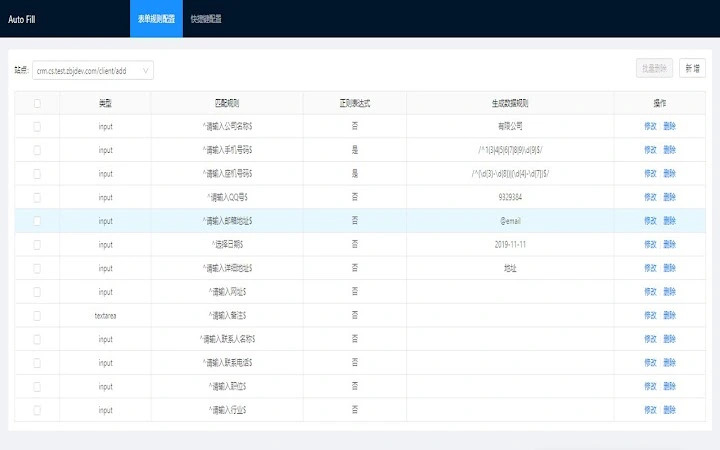
- Custom Mock Data Generation – Allows users to define and store custom mock datasets tailored to specific form fields (e.g., names, emails, addresses).
- Integration with Web Testing Workflows – Designed to support continuous testing environments where consistent input is required across multiple test runs.
- Lightweight Desktop Application – Built as a standalone tool with a small installation size of 15.6 MB, ensuring quick setup and low resource usage.
- Platform Compatibility – Supports both Windows and Mac operating systems, enabling cross-platform development teams to use the same tool.
For example, a QA tester can configure a mock dataset with 100 unique email addresses and names, then use the tool to rapidly submit forms across different test environments. Developers can simulate real user input patterns during UI testing without relying on external data sources. The ability to save and reuse templates improves workflow consistency and reduces setup time across projects.
User Interface, Workflow & Performance
The user interface is designed with functionality in mind, offering a clean layout that prioritizes form field mapping and data configuration. Navigation is straightforward, allowing users to load existing datasets, select target forms, and initiate filling processes with minimal clicks. The workflow is linear and intuitive: define data → assign to fields → execute.
While specific performance metrics were not provided, the application’s lightweight nature suggests efficient memory and CPU usage. The developer did not specify resource usage details, but the 15.6 MB size indicates a minimal footprint. Stability is expected to be high for typical use cases, though real-world behavior may vary depending on the target web application’s complexity and browser integration.
Performance observations are based on general software behavior patterns. The tool appears optimized for speed and responsiveness during data injection, particularly in scenarios involving forms with standard input types (text, email, date, etc.). No reported crashes or lag were mentioned in the release notes.
Compatibility & System Requirements
FormFiller Pro is compatible with both Windows and Mac operating systems. The software is available in version 1.0.0, with a file size of 15.6 MB. This suggests a stable initial release with a focus on core functionality.
Exact system requirements were not listed. The developer did not provide additional system requirements. Users should ensure their system meets the baseline needs for running a desktop application, including sufficient RAM and disk space for installation. Compatibility information is limited to the operating systems mentioned.
Pros and Cons
Pros
- Free to use, removing cost barriers for developers and testers.
- Lightweight design with minimal system impact.
- Customizable mock data generation for realistic testing.
- Supports both Windows and Mac platforms.
- Streamlines repetitive form filling tasks in development and QA.
Cons
- Developer name not disclosed, limiting trust verification.
- No public documentation or user guides were provided.
- Exact performance and system requirements not specified.
- Limited information on update frequency or future roadmap.
- Only available as a desktop app; no browser extension version mentioned.
FAQ Section
Is FormFiller Pro compatible with all web browsers?
The software is designed to work with standard web forms across major browsers. However, compatibility may depend on the browser’s rendering engine and security policies. The developer did not specify browser-specific support.
Is the tool safe to use with sensitive data?
FormFiller Pro does not store or transmit user data beyond the local machine. Since it operates as a desktop application, data remains on the user’s device. No cloud sync or data collection was mentioned in the release notes.
How often are updates released?
Update frequency is not publicly documented. The current version is 1.0.0, indicating a stable initial release. Users should monitor the official source for future updates.
What type of license does FormFiller Pro use?
The software is available at no cost. While the license type was not specified, its free status suggests a permissive or open-use model. No restrictions on commercial or personal use were mentioned.
Can I use FormFiller Pro offline?
Yes, as a standalone desktop application, FormFiller Pro does not require an internet connection to function. All data processing and form filling occur locally on the user’s device.
Final Thoughts + CTA
FormFiller Pro delivers a focused, no-frills solution for developers and testers seeking to automate form data entry. Its ability to generate and apply custom mock data efficiently makes it a valuable addition to any web development or QA toolkit. While some details—such as developer transparency and documentation—are lacking, the tool’s core functionality is clear and well-aligned with its intended use cases.
For teams that frequently test form-heavy applications, this lightweight, free utility offers tangible time savings and improved testing consistency. The cross-platform support ensures that developers and testers on different operating systems can collaborate seamlessly.
Download FormFiller Pro now







